Domain Viewer
This page mirrors the domain-viewer README (branch develop).
The repository is the source of truth.
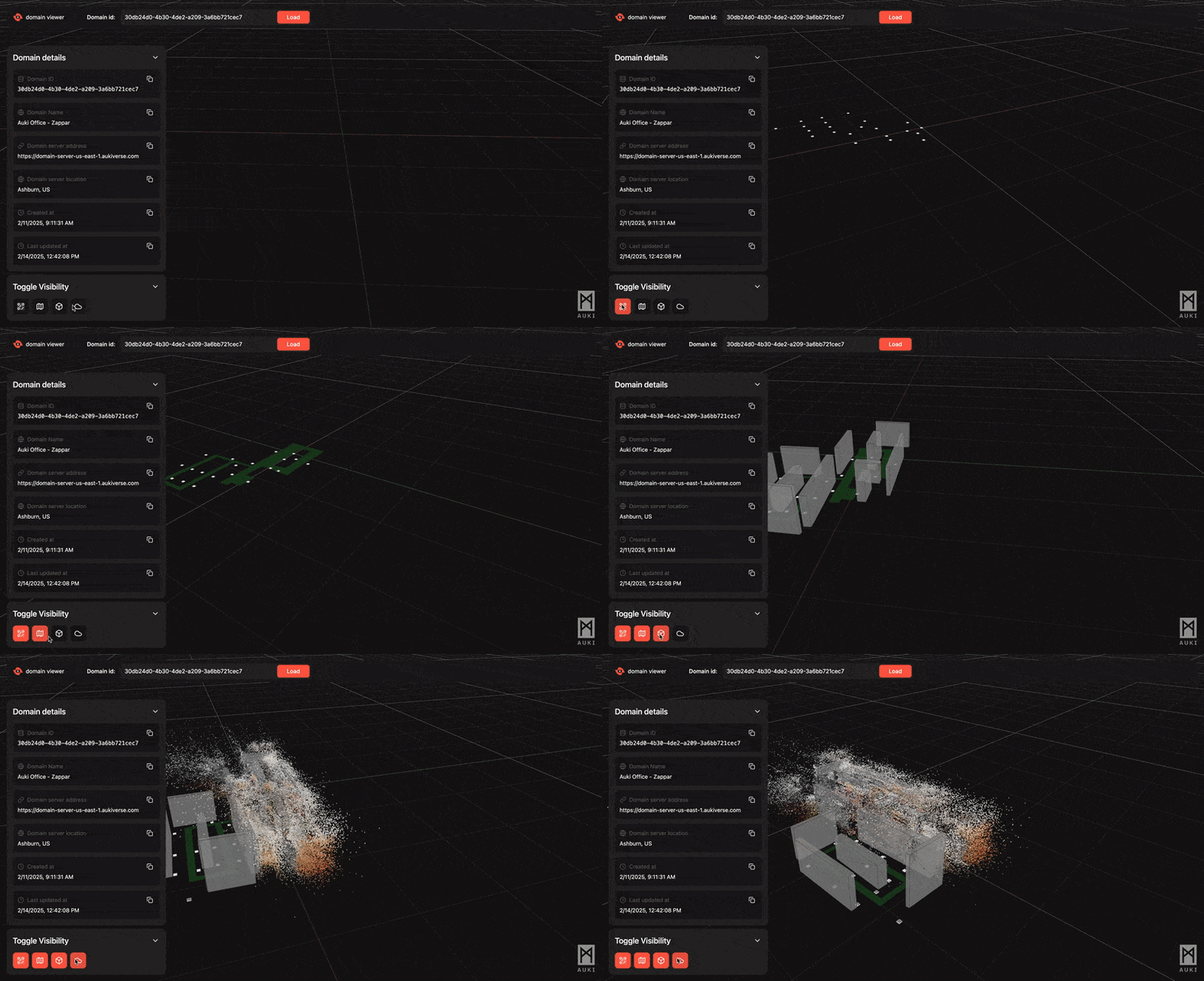
A web-based 3D visualization tool for exploring real world web domains. This application enables users to visualize the digital overlays of physical spaces, including point cloud data, navigation meshes, occlusion meshes, and portal locations in an intuitive 3D environment.
What are Domains?
Domains are digital overlays of physical spaces that bridge the gap between the physical and digital worlds. Powered by Auki Labs' posemesh technology, domains transform physical environments into interactive canvases for digital interactions and AI applications. They serve as the foundation for:
- Spatial Computing: Create and manage virtual real estate that maps directly to physical spaces
- Digital Navigation: Enable precise indoor positioning and wayfinding
- AR Experiences: Support augmented reality applications with accurate spatial awareness
- Operational Efficiency: Map and track assets, products, and resources in physical spaces
- Collaborative Environments: Enable asynchronous communication and interaction in spatial contexts
Whether you're developing retail solutions, creating immersive experiences, or building innovative spatial applications, domains provide the underlying infrastructure for seamless physical-digital bridges.
Features
- Interactive 3D visualization using Three.js and React Three Fiber
- Gaussian splat rendering via
@sparkjsdev/sparkwith dynamic loading, partitioned LOD, and reveal animations - Point cloud data rendering with color support
- Navigation and occlusion mesh visualization
- Portal location markers
- Visibility toggles for different data layers (all layers on by default, including splats)
- Fullscreen loading overlay with blur effect — stays visible until all data (including splat binaries) finishes downloading
- Auto-rotating camera when idle
- FPS Camera Mode (First Person View)
- Persisted Camera State
- Responsive grid system with infinite ground plane
- Domain information display with copy-to-clipboard functionality
Technology Stack
- Next.js 15
- React 19
- Three.js
- React Three Fiber
- @sparkjsdev/spark (Gaussian splat rendering engine)
- TypeScript
- Tailwind CSS
- Radix UI Components
- Lucide Icons
- Jotai (State Management)
- React Query (@tanstack/react-query)
Project Structure
├── app/ # Next.js app directory
│ ├── [id]/ # Dynamic domain viewer route
│ │ └── page.tsx # Individual domain viewer page
│ ├── actions.ts # Server actions for API calls to fetch domain data
│ ├── globals.css # Global CSS styles
│ ├── layout.tsx # Root layout component
│ └── page.tsx # Home page
├── components/ # React components
│ ├── 3d/ # 3D specific components
│ │ ├── spark-r3f/ # Gaussian splat rendering module
│ │ │ ├── index.ts # Web entry: re-exports SparkRenderer, SplatMesh, SplatFileType
│ │ │ ├── SparkRenderer.tsx # Initialises the Spark rendering engine
│ │ │ ├── SplatMesh.tsx # Renders a single Gaussian splat mesh
│ │ │ └── useSparkModule.ts # Dynamic import of @sparkjsdev/spark (SSR-safe)
│ │ ├── renderers/ # Renderer components
│ │ │ └── PointCloudRenderer.tsx # Point cloud renderer with vertex colors
│ │ ├── RefinementSplat.tsx # Composition: ties splat data loading to spark renderer
│ │ ├── FloorGrid.tsx # Infinite grid component
│ │ └── OriginLines.tsx # XYZ axis lines
│ ├── ui/ # Common reusable UI components
│ │ ├── button.tsx
│ │ ├── collapsible.tsx # Radix Collapsible primitives
│ │ └── input.tsx # Form input component
│ ├── DomainInfo.tsx # Domain metadata display panel
│ ├── FPSControls.tsx # First person camera controls
│ ├── Navbar.tsx # The top navigation bar component with domain id input field
│ ├── PersistedMapControls.tsx # Map controls with state persistence
│ ├── SkyBox.tsx # Skybox environment
│ ├── ToggleVisibility.tsx # Layer visibility controls
│ └── Viewer3D.tsx # Main 3D visualization component
├── hooks/ # Custom React hooks
│ ├── useRefinementSplat.ts # Loads partitioned/single-file Gaussian splat data
│ ├── useRefinementHasSplat.ts # Lightweight check for splat data existence
│ ├── useInterval.ts # Polling helper for periodic updates
│ └── useColorScheme.ts # Theme detection hook
├── types/ # TypeScript type definitions
│ └── splat.ts # SplatEffect type for reveal animations
├── store/ # Global state management
│ ├── domainStore.ts # Domain data, loading states (incl. splatLoadingAtom)
│ ├── visualizationStore.ts # Visibility toggles (portals, meshes, splat, etc.)
│ └── camera-store.ts # Camera position and target state
├── utils/ # Utility functions
│ ├── splatShaders.ts # GLSL shader utilities for splat reveal animations
│ ├── ply-parser.web.ts # PLY parsing with optional Web Worker
│ ├── posemeshClientApi.ts # Frontend API client
│ ├── posemeshServerApi.ts # Backend API client
│ └── three-utils.ts # Three.js helper functions
├── public/ # Static assets
│ ├── images/ # Image assets
│ ├── workers/ # Web Workers for processing point cloud files
│ └── QR.glb # A 3D model of a QR code (i.e. a portal)
├── lib/ # Shared libraries and configurations
│ └── utils.ts # Common utility functions
├── charts/ # Helm chart for Kubernetes deployments
│ └── domain-viewer/
│   ├── Chart.yaml
│   ├── values.yaml
│   ├── values.staging.yaml
│   └── values.prod.yaml
└── package.json # Project configuration
Getting Started
Prerequisites
- Node.js 18.x or later
- npm or yarn
- Docker (for containerized deployment)
Installation
Local Development
- Clone the repository:
git clone git@github.com:aukilabs/domain-viewer.git
cd domain-viewer
- Install dependencies:
npm install
- Create a
.env.localfile in the root directory with your credentials and servers:
AUKI_APP_KEY=your_app_key_here
AUKI_APP_SECRET=your_app_secret_here
AUKI_API_SERVER=https://api.auki.network         # or your provided API server
AUKI_DDS_SERVER=https://dds.auki.network         # or your provided DDS server

# Optional — Amplitude analytics (see "Analytics" section below)
NEXT_PUBLIC_AMPLITUDE_API_KEY=your_amplitude_api_key
- Run the development server:
npm run dev
Open http://localhost:3000 in your browser.
Docker Deployment
- Clone the repository and navigate to the project directory:
git clone git@github.com:aukilabs/domain-viewer.git
cd domain-viewer
-
Create a
.env.localfile with your Auki credentials and servers as shown above. -
Build and run with Docker Compose:
docker compose up -d
The application will be available at http://localhost:3000.
To stop the application:
docker compose down
Building for Production
Local Build
npm run build
Docker Build
docker compose build
Usage
- Enter a domain ID in the top navigation bar
- Click "Load" to fetch and display the domain data
- Use mouse/touch controls to navigate the 3D view:
- Left click + drag to rotate
- Right click + drag to pan
- Scroll to zoom
- Press 'F' to toggle FPS camera mode (WASD to move, Mouse to look)
- Toggle visibility of different layers using the buttons in the bottom left panel
- View domain details in the expandable panel
Analytics
This project includes optional Amplitude analytics integration. When configured, the following events are tracked:
| Event | Trigger |
|---|---|
page_viewed | Every route navigation |
session_started | Once per browser session |
domain_search_initiated | User submits a domain ID via the navbar |
domain_loaded | Domain data fetched successfully (includes load time, data availability metadata) |
domain_load_failed | Domain fetch errors (categorized as not_found, network, access_denied) |
viewer_interaction_started | First pointer or scroll interaction with the 3D viewer per domain |
camera_mode_switched | Toggling between map and FPS camera modes |
layer_toggled | Showing/hiding a visualization layer |
field_copied | Copying a value from the domain details panel |
preview_viewed | Loading the embed/preview route (includes referrer and embed context) |
Every event automatically includes view_context (e.g. twitter_embed, direct) and referrer_domain properties. Country, browser, device, and OS are captured by Amplitude automatically via IP geolocation and user-agent.
Setup
To enable analytics, add your Amplitude browser API key to .env.local:
NEXT_PUBLIC_AMPLITUDE_API_KEY=your_amplitude_api_key
If this variable is not set, analytics initialization is skipped and no events are sent. The app runs normally without it.
Contributing
Contributions are welcome! Please feel free to submit a Pull Request.
Acknowledgments
ℹ️ Info: This code was generated with the assistance of AI tools. While efforts have been made to ensure quality and functionality, users should exercise appropriate caution and review critical components, especially those handling security, data processing, or core business logic.